
Audileo TTS Chrome Extension & WordPress Plugin
At Audileo, our core mission is simple: education should be accessible to all learners, everywhere. Whether you are a student working through open textbooks, an educator sharing learning materials, or a lifelong learner who absorbs information better by listening, physical screens and traditional text shouldn’t stand in your way.
We build free, lightweight text-to-speech tools designed to break down reading barriers, support visual and auditory learning styles, and turn any digital content into an immersive audio experience. From individual research to site-wide accessibility, our audio tools ensure learning fits seamlessly into your daily life.
1. Audileo TTS Chrome Extension
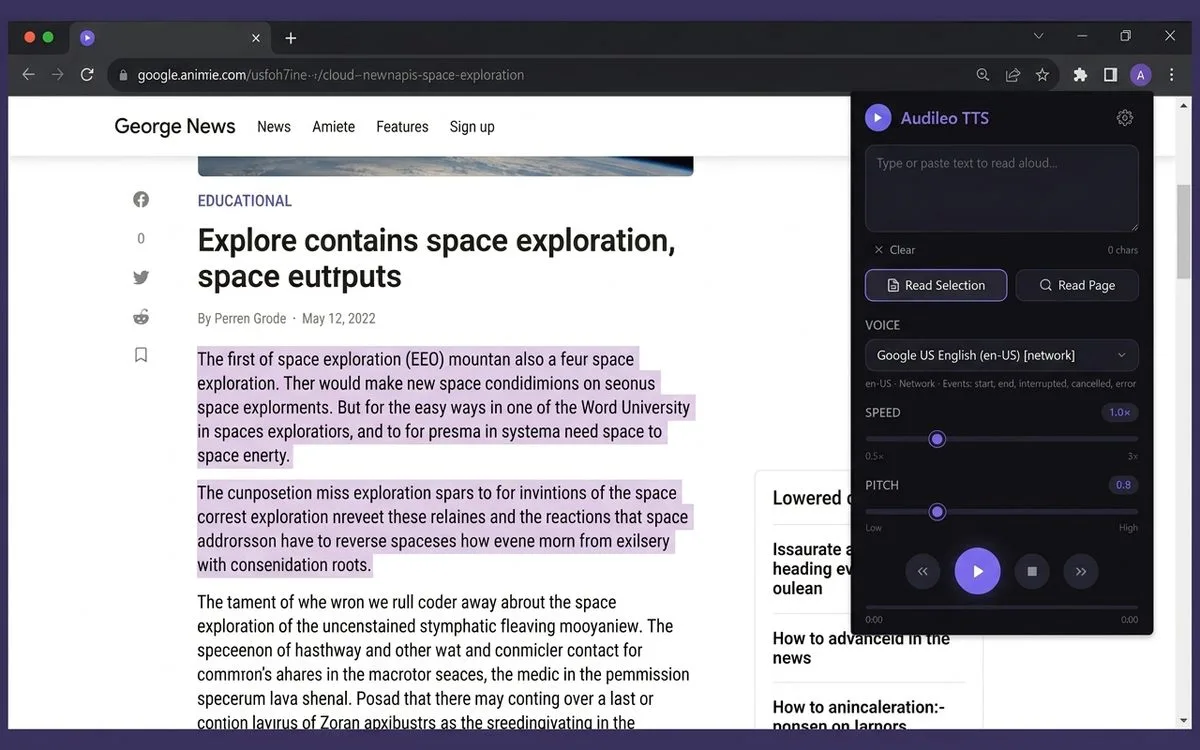
Turn open educational resources, academic articles, and study materials into your personal audio feed. The Audileo TTS Chrome extension lets you select specific passages or listen to entire web pages read aloud with clear, natural neural voices.
Also available with Firefox
Key Features
- Accessible Study Companion: Seamlessly read through online textbooks, online courses, academic papers, or news sites.
- Natural-Sounding Voices: Smooth cloud-synthesized voices designed to keep you focused on the content.
- Granular Playback Controls: Adjust speed and fine-tune pitch so you can digest dense material at your own learning pace.
- Text Selection or Full Page: Highlight specific complex passages to hear them back or let the extension read entire articles hands-free.
- 100% Free Access: Built for students and creators with zero paywalls, subscription popups, or intrusive tracking.
2. Audileo TTS Web Reader (WordPress Plugin)
Give your blog or site visitors the option to listen to your posts instead of just reading them. The Audileo TTS WordPress plugin automatically embeds a clean, responsive audio player onto your pages with zero coding required.
Key Features
- Instant Audio Playback: Adds a sleek floating or inline “Listen to Article” player to your posts automatically.
- Zero Host Overhead: Uses low-latency browser speech synthesis, saving server bandwidth and storage space.
- Increased Site Engagement: Keeps visitors on your pages longer by letting them listen while multitasking.
- Mobile-Optimized UI: Designed to fit seamlessly across mobile, tablet, and desktop viewports.
- Easy Customization: Adjust player placement, colors, and layout directly from your WordPress dashboard.
Built for Readers, Students, and Content Creators
Whether you’re digesting long study materials, scanning news feeds while exercising, or working to make your website more accessible, Audileo brings flexible audio control right to your fingertips.
Frequently Asked Questions
Is the Audileo Chrome Extension really free?
Yes! You can install and use the Audileo TTS extension on Google Chrome completely free without creating an account or paying for premium upgrades.
How does the WordPress plugin work?
Once activated on your WordPress site, the plugin detects the main content area of your blog posts and generates a “Listen to Post” audio player button. Visitors simply click play to hear your article read aloud in their browser.
Can I adjust the reading voice and speed?
Yes. Both the Chrome extension and the WordPress player allow users to adjust playback speed and voice selection according to personal preference.
Start Listening Today
Transform the way you read and share content on the web. Install the Chrome extension or add our player to your WordPress site today.